New Dealer Registration FAQs
What is Manheim.com?
Manheim.com is an easy-to-use digital platform for wholesale vehicle researching, buying and selling. Manheim.com combines the greatest number of buyers and sellers with the most wholesale inventory in the industry.
When I try to sign up for Manheim.com, it asks me for an Auction Access ID. What is Auction Access and why do I need it?
Auction Access is a dealer authentication service that confirms you are an authorized dealer. You will need to visit www.AuctionAccess.com to register. Once you have provided them the information and documentation they need to show you are an authorized dealer, they will confirm your membership and give you an Auction Access ID number.
How do I register on Manheim once I have my Auction Access ID Number?
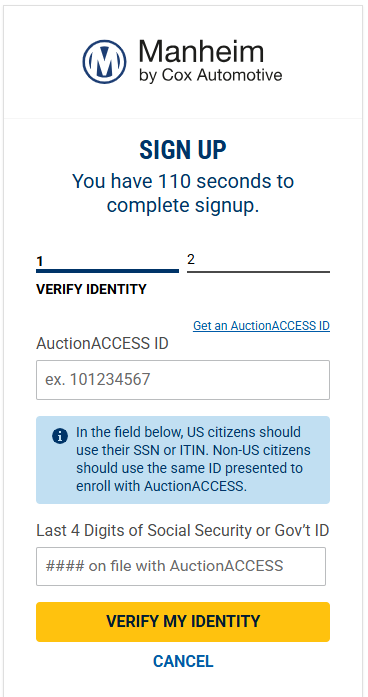
Once you are confirmed by Auction Access and given an ID number, go to Manheim.com and click Sign Up in the top right corner. From there, please enter your Auction Access ID number and the last 4 digits of your Social Security number or government identification.
What do I go to Auction Access for?
AuctionACCESS and Manheim handle different parts of your setup. Go to AuctionACCESS for:
- New dealer registration application
- Registering, authorizating, and removing users from your account
- Uploading or renewing required documents — driver’s license, dealer license, W9
- Adding or updating your bank account information (this must be complete and verified to set up ACH as a payment method on Manheim.com)
- Updating your dealership’s business information
If you need support from AuctionACCESS, please call (205) 414-2739 or email customerservice@auctionaccess.com.
Important: Registering with AuctionACCESS does not automatically register you with Manheim. They’re two separate processes with different requirements. You need both.
How do I set up my account when logging into Manheim.com for the first time?
Once you’ve set up your Auction Access account, you can set up ACH payments in your Manheim account to ensure you are ready to start buying and selling in the marketplace.
One of the next things you should do is set the types of notifications you receive to meet your needs. You can do that in the profile and notifications settings. This is where you choose things like how and where you would like to receive titles, set up autopayment, receive lane alerts, and more.
To find them, look at the top righthand corner of Manheim.com, where you will see the Your Manheim Account button. Click that to see a dropdown menu with links to your profile and notifications settings, as well as other useful items such as Post Sale Management. If you want more information, you can watch our notifications and preferences best practices video.
I registered with AuctionACCESS. Why can’t I create my Manheim account?
A few things to check: your AuctionACCESS membership must be fully confirmed and active (not just submitted), and you’ll need to enter your AuctionACCESS ID exactly as issued along with the last 4 digits of your SSN or government ID. If your AuctionACCESS registration is still pending or your documents are incomplete, contact AuctionACCESS at 205-414-2739. If your membership is confirmed and you still can’t sign up, contact Manheim support.
How do I update my profile or business information?
Dealership and license information — name, address, dealer license, representatives — is maintained in AuctionACCESS. Your Manheim.com preferences — notifications, alerts, title delivery — are managed under Your Manheim Account.
After setting up account Profile and Notifications on Manheim.com, what should I do to become more familiar with Manheim’s Marketplace?
After setting up your account preferences and notifications, we have placed a few key areas under Quick Links on the lefthand side of manheim.com to help you research, purchase vehicles and manage your account.
- Post-Sale Management are actions, like making payment, ordering an inspection, printing a vehicle release, that you can take after you make your first purchase
- Proxy Bid/ Watch will show the vehicles running in a live sale that you‘ve placed a maximum bid amount, or proxy bid, on, where Manheim.com will bid up to that amount on your behalf. While there, you can increase, decrease or remove a proxy bid
- Workbook is a personal list of vehicles you‘ve saved to continuously monitor and possibly purchase
- Saved Searches is an area to view and run previously saved searches. These are searched saved by you, based on criteria defined by you
Click the Buy tab in the header to find the MMR (Manheim Market Report), where you can check Manheim’s wholesale value of vehicles, Post Sale Results, and our Sales and Events, different sale channels for vehicles to purchase now or in an upcoming sale. You can also look under Top Makes or Vehicle Types to see some of the most commonly used and helpful vehicle searches.
The Solutions tab can help you to get a better understanding of Manheim’s unique marketplace offerings, such as the vehicles protections and assurance we offer, our vehicle transportation and logistics services, access to a library of video tutorials and much more.
Finally, make sure you take time to review Manheim’s Marketplace policies by clicking at the bottom of any page at Manheim.com. Understanding the policies for the marketplace and obligations for both the buyers and sellers across different purchasing channels will significantly prevent mistakes or guide you when issues arise.

