Timed Sale Listing Policy Central
Your Guide to the New Marketplace Standard
What Is the Timed Sale Listing Policy?
A marketplace-wide policy that deactivates listings priced above the MMR upper limit that have gone 4 or more weeks without a qualifying price decrease.
This policy applies to all inventory types, whether or not a listing carries a Manheim Market Report (MMR) value, with the exception of Specialty and Commercial Truck & Equipment listings.
How the Policy Works
The Trigger
A listing becomes deactivated when both of the following are true at the same time:
- The controlling price has not decreased by $1 or more in 4 or more weeks (8 weeks for Independent Auctions at launch, phasing to 4 weeks over approximately 6 months), and
- The controlling price remains above the MMR upper limit.
For listings without an MMR range, a listing becomes eligible for deactivation when the controlling price has not decreased in 4 or more weeks.
The Controlling Price
The controlling price is determined by listing type:
- Bid / Make an Offer (MAO) listings: Floor price
- Buy It Now (BIN) listings: BIN price
Starting price is not used to evaluate whether a listing is subject to this policy.
Listing States
Listings move through the following states under this policy: Active, At Risk, Blocked, Deactivated, and Reactivated.
Reactivating a Listing
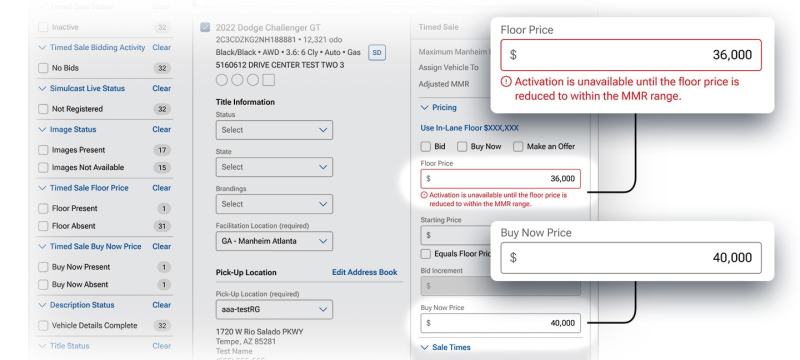
To bring a Deactivated listing back to Active status, the following measurable actions apply:
- For listings with an MMR value: reduce the Floor or BIN price to at or below the MMR upper limit, and ensure the starting price is at or below the Floor price.
- For listings without an MMR value: reduce the Floor or BIN price from its previous value.
Notifications and Alerts
Sellers are notified through multiple channels ahead of any change in listing status:
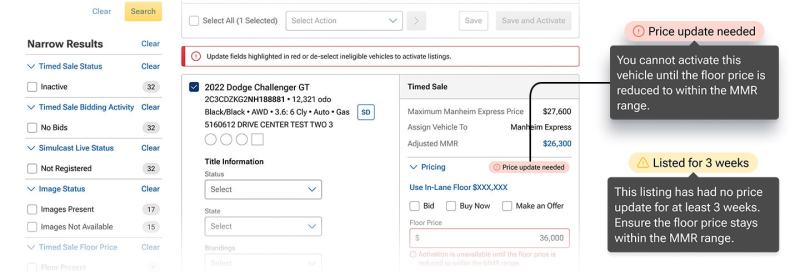
- At-Risk Warning: A yellow warning appears in the Selling Center and Inventory Manager 7 days before a listing is eligible for deactivation, and a weekly at-risk digest email is sent summarizing all At-Risk inventory.

- Final Warning: A 3-day advance email notice is sent before a listing moves to Blocked status.
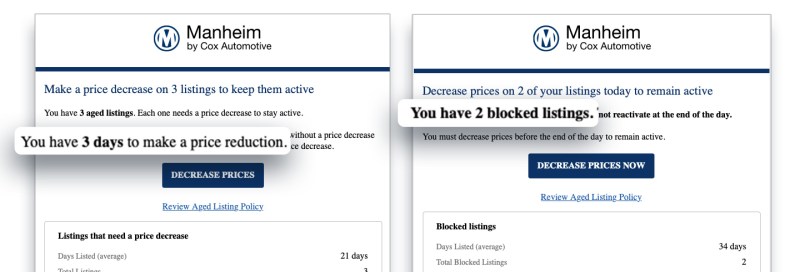
- Deactivation Notice: On the day a listing is deactivated, sellers receive an email confirming the change and outlining reactivation steps.
- Bulk Load Errors: If a bulk-load listing fails to go live due to this policy, an automated email is sent with support contact information.
In the Selling Center and Inventory Manager, At-Risk listings are highlighted in yellow and Blocked listings are highlighted in red for quick identification.
Exclusions
The following are not subject to the Timed Sale Listing Policy:
- Specialty vehicles
- Commercial Truck & Equipment
Frequently Asked Questions
Frequently Asked Questions
Which listings are affected?
Which listings are affected?
All inventory types are included except Specialty and Commercial Truck & Equipment listings.
How can I reactivate a Blocked listing?
How can I reactivate a Blocked listing?
For vehicles with an MMR value, reduce the Floor or BIN price to at or below the MMR upper limit. For vehicles without an MMR value, reduce the Floor or BIN price from its previous value.
How will I know if my listings are At Risk or Blocked?
How will I know if my listings are At Risk or Blocked?
You will see in-platform alerts in the Selling Center and Inventory Manager, along with email notifications: a weekly at-risk digest, a 3-day final warning, and a same-day deactivation notice.
What support is available?
What support is available?
Contact your Manheim account representative with any questions about this policy or how it may affect your inventory. Sellers experiencing bulk-load issues can reach out to the Bulk Load Support Team for assistance.

